Install Sigilium at the Google Workspace API level
Install Sigilium from the marketplace of Google Workspace
We recommend installing the application using the marketplace:
https://workspace.google.com/marketplace/app/signatures_email_sigilium/691154681190?hl=en
Notice: you will then need to provide us with the email address of the admin who installed it.
Install Sigilium via Google API
Otherwise, here are the instructions for installing Sigilium on the server side.
(to be forwarded to the Google Apps administrator)
-
Go to your Google Apps account: https://admin.google.com/ac/owl/domainwidedelegation
Or go to admin.google.com, then on the left, click More info => Security => API controls => Domain-wide delegation
- Go to the Manage API access link
- Copy and paste the following permission:
Client ID:
691154681190-0v4ra8eljnmkv2u5pvistrmcsk0ej58r.apps.googleusercontent.com
API scopes:
The following scope is also useful if you want us to be able to create a signature automatically when creating a user:
https://www.googleapis.com/auth/admin.directory.user.readonly
Finally, this scope allows us to synchronize only certain groups: https://www.googleapis.com/auth/admin.directory.group.readonly
These rights are described here: https://developers.google.com/gmail/api/auth/scopes
The right will then appear as follows: if the instruction “Email Settings (Read/Write)” is not in bold, you must carefully check that the key does not contain any spaces: Email Settings (Read/Write)
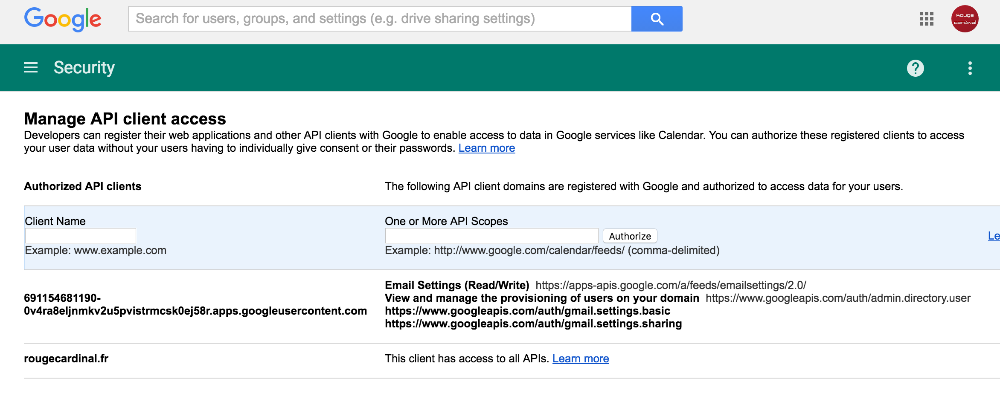
- Confirm and send an email to contact@sigilium.com with the email address of the Google account administrator who authorized the request.
- We will then activate the Sigilium signatures.
Any questions ?
You can describe your problem orally in a few seconds leaving a message on the
+33 1 83 64 02 13
You would rather write it down? We are happy to help in response to your email at